 I’m still getting a lot of traffic from people looking for Seaport.exe and how to remove it – Seaport.exe, a battle of the cloud. It’s not a virus, it’s an app from Microsoft for souping up search. If you want to disable it here’s how:
Update: How to stop seaport.exe
Here’s the basics on stopping seaport.exe
For Vista go to Start and Start Search and enter “services.msc”
For XP go to Start Run

and enter “services.msc”
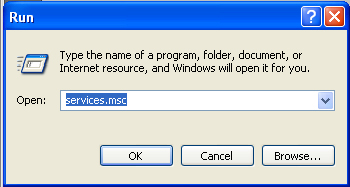
Click OK. Next you’ll get this screen pop up:

Scroll down do seaport.exe, right click and select Properties – a box like this will appear:
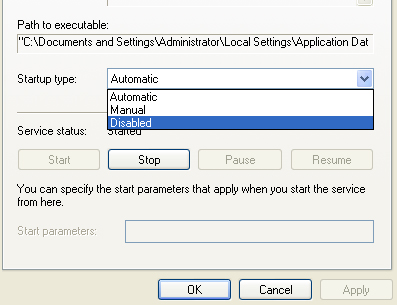
Go to Startup Type and select Disabled.
This should stop it hogging up your machine working.
18 replies on “What is Seaport.exe?”
Thought I’d let you know that there’s an error in the instructions. In the 2nd Instruction Set, it states to “[click] hide all microsoft services”. Since it is a Microsoft product, clicking to hide all of their products results in the program not being displayed in the list. No big deal, but thought you might want to know.
Sorry Ron but i have to say you are wrong.
I have a PC right in front of me as I type that has seaport in the services tab. With the “hide all ms services” checked, it still shows seaport. No big deal, but thought you might want to know.
Thanks! Worked great!
I have disabled SeaPort everywhere I can find it and have deleted
it from the registry. Now I am getting a pop up window that says
Microsoft on the tool bar with nothing displayed in the window
where the Search Enhancement Pack folder used to appear. Any
suggestions on how to get rid of this annoying window that comes up
whenever you log on? Thanks.
thanks
how to remove userinit.exe and unwise_.exe ???
how to remove hkcmd, iamapi.exe
all these are dagnerous viruses
Thanks for the tip 😀
I have it disabled and it appears to be working , but now when I log on my machine the Microsoft folder open on my desktop. How do I stop this from happening
Thanks so much. It’s disabled now, and my machine is much calmer.
Wish I’d known about this years ago.
Hey dib, aren’t you clever?
Seaport.exe seems to restart itself under vista, even after the
service has been stopped and the startup type set to disabled…
Find the Seaport Prefetch file and delete it.
i use comodo firewall, and insted of disableing it because win7 just turns it back on i turned seaport.exe into a “block application” now i no longer get in-game lag, and it also blocks the app from running at all also i dont use IE, i use firefox insted, so there is no need for seaport at all
Instead of disabling it, I ran this command on my XP PC to permanently uninstall the SeaPort service:
MsiExec.exe /X{06E6E30D-B498-442F-A943-07DE41D7F785}
Thank you, very much.
🙂
(Windows XP user)
I have SeaPort.exe in my Task Manager, but it does not appear in the Services list.
I do not see the “hide all Microsoft Services” others have mentioned.
I also have SeaPort.exe running and its not on the Services list. I found it is part of Bing Bar. Bing Bar can be removed with the “Add or Remove Programs” tool in control panel.